
Catch-up and pause
Watch live TV on your own time
Live television runs on its own clock. Aina gives you three ways round it: catch-up for what has already aired, pause for what is on now, and a reminder for what is still to come.
Updated · By the Aina IPTV team
Catch-up: replay what has aired
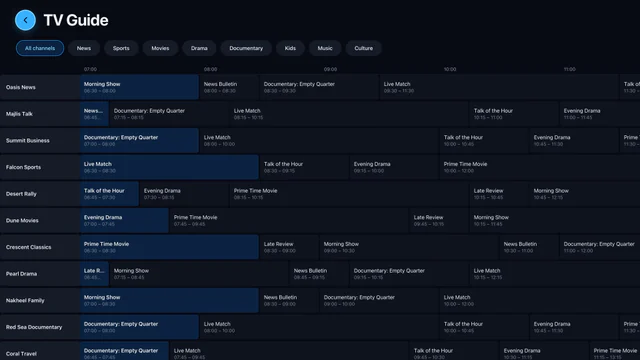
Many providers keep an archive of what their channels showed, for a few days or a week. Where yours does, Aina marks those programmes in each channel’s schedule, and they play from their start, with the timeline to move through them as through a film.
- From the schedule: open a channel’s schedule, go back a day with the chips at the top, and choose a programme with the catch-up mark.
- From what is on now: the card at the top of a channel’s schedule has From the start beside Watch, to begin the programme on air from its first minute.
- From Live TV: hold a channel for its menu, and Catch-up opens its schedule at the programme before the one on now.
- In the guide grid on a tablet or a television, a programme that has already aired plays from the archive.
It works with an Xtream Codes line’s archive, an M3U playlist’s catch-up attributes, and a MAC portal’s archive. How far back you can go is your provider’s choice, not Aina’s.
Pause a live channel
Press pause on a live channel and Aina holds it there. Press play and it goes on from the moment you paused, not from wherever the broadcast has got to.
- While you are behind, the LIVE badge becomes a button that says how far behind you are, such as −9:35, and takes you back to live in one press.
- It works on channels sent as MPEG-TS, which most IPTV channels are.
- After half an hour paused (a quarter of an hour on a television) the stream is let go, so it is not held open for nothing, and play opens the channel live.
Reminders: never miss the start
- Press a programme or a match still to come, in a channel’s schedule, in the player’s schedule panel or in Sports, and a bell marks the reminder.
- On a phone or a tablet, a notification arrives five minutes before it starts; tapping it opens the channel.
- On a television, which shows no notifications from apps, Aina goes to the channel by itself as the programme starts, while the app is open.
- Settings, then Library, then Reminders lists them all, soonest first, to remove one or to watch it once it is on.
Not in Aina: recording. Catch-up and downloads of films and episodes cover most of what recording is used for.
Questions and answers
Catch-up comes from your provider’s archive. Providers archive some channels and not others, for as many days as they choose; Aina shows it wherever it exists.
No: pause holds the channel from the moment you paused. For a programme that started earlier, use From the start, where your provider keeps an archive.
Yes, differently: a television shows no notification from an app, so while Aina is open it goes to the channel by itself as the programme starts.