'/%3e%3c/clipPath%3e%3cclipPath%20id='back'%3e%3crect%20x='-2000'%20y='-2000'%20width='4000'%20height='2004'%20transform='rotate(-30)'/%3e%3c/clipPath%3e%3cmask%20id='under-front'%20maskUnits='userSpaceOnUse'%20x='-490'%20y='-524'%20width='980'%20height='848'%3e%3crect%20x='-490'%20y='-524'%20width='980'%20height='848'%20fill='%23fff'/%3e%3cg%20clip-path='url(%23front)'%3e%3cpath%20transform='rotate(-30)'%20d='M-536%200%20A536%20166%200%201%200%20536%200%20A536%20166%200%201%200%20-536%200%20Z%20M-464%20-28%20A464%2094%200%201%200%20464%20-28%20A464%2094%200%201%200%20-464%20-28%20Z'%20fill-rule='evenodd'%20fill='%23000'%20stroke='%23000'%20stroke-width='64'/%3e%3c/g%3e%3c/mask%3e%3cmask%20id='behind-play'%20maskUnits='userSpaceOnUse'%20x='-490'%20y='-524'%20width='980'%20height='848'%3e%3crect%20x='-490'%20y='-524'%20width='980'%20height='848'%20fill='%23fff'/%3e%3cpath%20d='M-310%20-454.449%20A50%2050%200%200%201%20-235%20-497.75%20L275%20-203.301%20A50%2050%200%200%201%20275%20-116.699%20L-235%20177.75%20A50%2050%200%200%201%20-310%20134.449%20L-310%20-454.449%20Z'%20fill='%23000'%20stroke='%23000'%20stroke-width='64'%20stroke-linejoin='round'/%3e%3c/mask%3e%3c/defs%3e%3cpath%20d='M-310%20-454.449%20A50%2050%200%200%201%20-235%20-497.75%20L275%20-203.301%20A50%2050%200%200%201%20275%20-116.699%20L-235%20177.75%20A50%2050%200%200%201%20-310%20134.449%20L-310%20-454.449%20Z'%20fill='url(%23play)'%20mask='url(%23under-front)'/%3e%3cg%20mask='url(%23behind-play)'%3e%3cg%20clip-path='url(%23back)'%3e%3cpath%20transform='rotate(-30)'%20d='M-536%200%20A536%20166%200%201%200%20536%200%20A536%20166%200%201%200%20-536%200%20Z%20M-464%20-28%20A464%2094%200%201%200%20464%20-28%20A464%2094%200%201%200%20-464%20-28%20Z'%20fill-rule='evenodd'%20fill='url(%23orbit)'/%3e%3c/g%3e%3c/g%3e%3cg%20clip-path='url(%23front)'%3e%3cpath%20transform='rotate(-30)'%20d='M-536%200%20A536%20166%200%201%200%20536%200%20A536%20166%200%201%200%20-536%200%20Z%20M-464%20-28%20A464%2094%200%201%200%20464%20-28%20A464%2094%200%201%200%20-464%20-28%20Z'%20fill-rule='evenodd'%20fill='url(%23orbit)'/%3e%3c/g%3e%3c/svg%3e)
Apple TV
An IPTV player made for Apple TV
Aina brings your IPTV subscription to the biggest screen in the house: every channel, a guide you can read from the sofa, and films and series with their posters, all driven by the Siri Remote alone.
Updated · By the Aina IPTV team
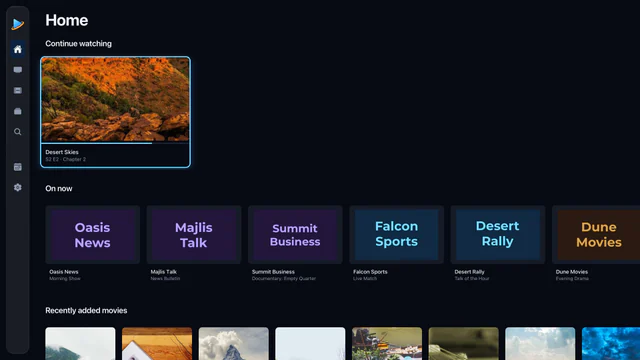
Made for the Siri Remote
- A focus rail down the side of every screen, and type sized to be read from across the room.
- Move, press and swipe: every control is within reach of the remote, with nothing that needs touch.
- Change channel and seek with the remote, without leaving the picture.
- Volume and brightness in the player’s controls, as two bars the remote moves a step at a time.
Plays what Apple’s own player turns down
The player built into Apple TV opens HLS and little else, and many IPTV providers send MPEG-TS or MKV. Aina plays every stream with libVLC, built for tvOS, so the same channels and films play here as on your phone, in the same player, with audio tracks, subtitles and catch-up.
Everything from your line
- Live TV with now and next under every channel, favourites and categories.
- The TV guide: what is on now and tonight across your line, a programme search, and a week per channel.
- Catch-up on the channels your provider archives.
- Films and series with posters and plots, seasons and episodes, and resume where you stopped.
- One search across all of it.
- Xtream Codes logins and M3U playlists, as many as you have.
Set it up
- 1
Get Aina on your Apple TV
From the App Store on the Apple TV itself. Aina is coming to the App Store soon.
- 2
Add your subscription
Choose Xtream Codes or M3U playlist, and type in what your provider sent.
- 3
Type it the easy way
Long addresses are tedious with a remote. When a field is open, a nearby iPhone usually offers its keyboard: type there, and the text appears on the television.
- 4
Watch
Your channels, films and series fill in as they load, and open straight away from then on.
What you need
An Apple TV HD or Apple TV 4K with tvOS 16.4 or later, an internet connection, and a subscription from an IPTV provider of your choosing, as an Xtream Codes login or an M3U playlist link.
Questions and answers
One that plays the TS and MKV streams providers send, reads your guide, and is built for the Siri Remote. Aina does all three, with catch-up, films and series, and a 7-day free trial.
Yes. Aina runs on the Apple TV itself. An iPhone only helps with typing a long address.
Yes: now and next on every channel, a guide of what is on tonight, a week per channel, and catch-up wherever your provider keeps an archive.
No. Aina is a player for the subscription you bring. It sells no content and includes none.