'/%3e%3c/clipPath%3e%3cclipPath%20id='back'%3e%3crect%20x='-2000'%20y='-2000'%20width='4000'%20height='2004'%20transform='rotate(-30)'/%3e%3c/clipPath%3e%3cmask%20id='under-front'%20maskUnits='userSpaceOnUse'%20x='-490'%20y='-524'%20width='980'%20height='848'%3e%3crect%20x='-490'%20y='-524'%20width='980'%20height='848'%20fill='%23fff'/%3e%3cg%20clip-path='url(%23front)'%3e%3cpath%20transform='rotate(-30)'%20d='M-536%200%20A536%20166%200%201%200%20536%200%20A536%20166%200%201%200%20-536%200%20Z%20M-464%20-28%20A464%2094%200%201%200%20464%20-28%20A464%2094%200%201%200%20-464%20-28%20Z'%20fill-rule='evenodd'%20fill='%23000'%20stroke='%23000'%20stroke-width='64'/%3e%3c/g%3e%3c/mask%3e%3cmask%20id='behind-play'%20maskUnits='userSpaceOnUse'%20x='-490'%20y='-524'%20width='980'%20height='848'%3e%3crect%20x='-490'%20y='-524'%20width='980'%20height='848'%20fill='%23fff'/%3e%3cpath%20d='M-310%20-454.449%20A50%2050%200%200%201%20-235%20-497.75%20L275%20-203.301%20A50%2050%200%200%201%20275%20-116.699%20L-235%20177.75%20A50%2050%200%200%201%20-310%20134.449%20L-310%20-454.449%20Z'%20fill='%23000'%20stroke='%23000'%20stroke-width='64'%20stroke-linejoin='round'/%3e%3c/mask%3e%3c/defs%3e%3cpath%20d='M-310%20-454.449%20A50%2050%200%200%201%20-235%20-497.75%20L275%20-203.301%20A50%2050%200%200%201%20275%20-116.699%20L-235%20177.75%20A50%2050%200%200%201%20-310%20134.449%20L-310%20-454.449%20Z'%20fill='url(%23play)'%20mask='url(%23under-front)'/%3e%3cg%20mask='url(%23behind-play)'%3e%3cg%20clip-path='url(%23back)'%3e%3cpath%20transform='rotate(-30)'%20d='M-536%200%20A536%20166%200%201%200%20536%200%20A536%20166%200%201%200%20-536%200%20Z%20M-464%20-28%20A464%2094%200%201%200%20464%20-28%20A464%2094%200%201%200%20-464%20-28%20Z'%20fill-rule='evenodd'%20fill='url(%23orbit)'/%3e%3c/g%3e%3c/g%3e%3cg%20clip-path='url(%23front)'%3e%3cpath%20transform='rotate(-30)'%20d='M-536%200%20A536%20166%200%201%200%20536%200%20A536%20166%200%201%200%20-536%200%20Z%20M-464%20-28%20A464%2094%200%201%200%20464%20-28%20A464%2094%200%201%200%20-464%20-28%20Z'%20fill-rule='evenodd'%20fill='url(%23orbit)'/%3e%3c/g%3e%3c/svg%3e)
Xtream Codes player
An Xtream Codes player for every screen
Enter the three things your provider sent, the server URL, your username and your password, and Aina brings in your whole line: live channels, films and series with their categories, and the guide, with catch-up where your provider keeps an archive.
Updated · By the Aina IPTV team
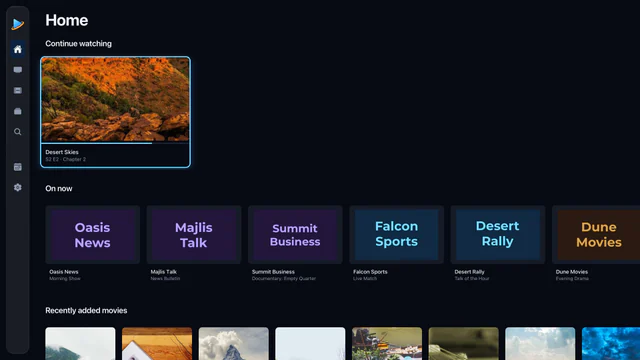
What an Xtream Codes login brings
- Live TV, films and series as three libraries, each with your provider’s categories.
- Films and series with their details: posters, plot, cast, rating and running time where the provider has them, and seasons and episodes for every series.
- The guide, without asking. Aina fetches the panel’s own XMLTV guide, so there is no guide link to find.
- Catch-up, on the channels your provider archives, for as many days as it keeps.
- Your line’s expiry date, shown with the subscription.
That is why an Xtream Codes login is usually the better choice when a provider offers both. M3U or Xtream Codes? compares the two.
Built for big panels
A big panel answers with lists of tens of megabytes, and often slowly. Aina waits for a slow panel rather than cutting it off at a fixed timeout, then keeps the whole library on the device. In our tests a line of 40,000 channels, 150,000 films and 20,000 series refreshed in under half a minute, and a library that size then opens straight away.
Sign in
- 1
Choose Xtream Codes
On Add your subscription, the Xtream Codes tab is the first. Signed in already? Settings, then Subscriptions, then Add a subscription.
- 2
Enter the server URL
As your provider wrote it, with its port, for example
http://example.com:8080. You can leave outhttp://, and anything after the port is ignored. - 3
Enter your username and password
Exactly as sent: both are case-sensitive, and a space copied by accident is enough to fail.
- 4
Connect
Name the subscription if you like, and tap Connect.
Something not working? How to sign in with Xtream Codes goes through the usual mistakes, and how to read a login out of an M3U link.
Connections, and more than one device
Most lines allow a set number of streams at once. Aina keeps the same login on as many devices as you add it to, but your provider decides how many can play together. On a line that allows one connection, a download waits while you watch and carries on when you stop, so the two never fight over it.
Questions and answers
Panel software that many IPTV providers use to manage their lines. To you it is a login of three parts: a server URL, a username and a password.
In the email or page your provider sent when you subscribed. It may be called the portal, host, server or DNS. If you only have an M3U link, the server is the part before /get.php.
Yes, as many as you like, and M3U playlists beside them. Move between them in a tap.
Not today. Aina signs in with Xtream Codes logins and M3U playlists. Many providers offer one of those alongside a MAC portal: ask yours.