
Guide
How to install IPTV on Apple TV
Apple TV is one of the best boxes there is for IPTV, as long as the player can open what your provider sends. Here is how to set it up with Aina, from the App Store to the first channel, and how to get around once it is in.
Updated · By the Aina IPTV team
Which Apple TV?
Aina needs tvOS 16.4 or later, so it runs on every Apple TV with the App Store that is up to date: the Apple TV 4K, every generation, and the Apple TV HD. To check, open Settings, then General, then About on the Apple TV.
| Model | Runs Aina |
|---|---|
| Apple TV 4K (every generation) | Yes, from the App Store |
| Apple TV HD | Yes, with tvOS 16.4 or later |
| Apple TV (3rd generation) and older | No: they have no App Store |
What you need
- What your IPTV provider sent you: an Xtream Codes login (server, username and password), an M3U playlist link, or a MAC portal and the MAC address it was registered for.
- Your Apple Account signed in on the Apple TV, for the App Store.
- Your iPhone or any phone, if you would rather not type with the Siri Remote.
Install it, step by step
- 1
Get Aina from the App Store
On the Apple TV, open the App Store, choose Search and type Aina IPTV, then Get. It is the same app as on iPhone and iPad: Aina on the App Store.
- 2
Open Aina
It opens on Sign in from your phone: a QR code and three short steps, with the form one press away for those who would rather use the remote.
- 3
Sign in from your phone
Open the phone’s camera, point it at the code, and type your subscription’s details on the page that opens. The Apple TV signs in by itself. It works for every kind: Xtream Codes, M3U playlist and MAC portal, and from an Android phone as well as an iPhone.
- 4
Or type it with the remote
Choose Xtream Codes and fill in the server, username and password; or M3U playlist and its link; or MAC portal, the portal and the MAC address. You can leave out
http://, and a provider’s wholeget.php?username=…&password=…link pasted into the server field fills in all three. A nearby iPhone offers its own keyboard for whatever field is open, which is much quicker than the on-screen one. Then Connect. - 5
Start the free week, and watch
Channels, films and series fill in as they load. The first time you play something, Aina offers the 7 free days, started on the App Store’s own sheet: nothing is charged, and nothing renews by itself when the week is up. From then on Aina opens straight to your library.
Already paid on your iPhone?
Then there is nothing to buy again. A purchase belongs to your Apple Account, so the full version you bought on an iPhone or iPad is yours on the Apple TV signed in with the same account; Restore purchases brings it over if it does not appear by itself. After the trial: $3.99 a month, $19.99 a year or $49.99 once (US prices). Your library and the guide stay open either way.
Getting around with the Siri Remote
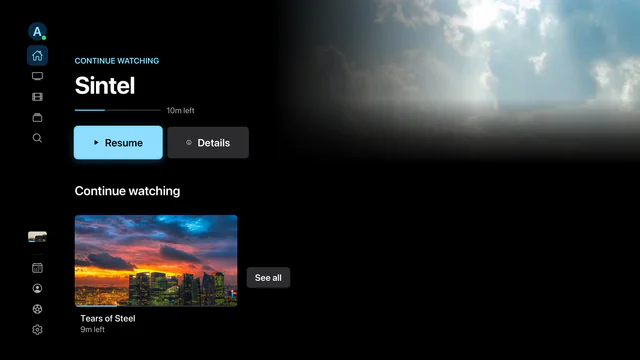
- A rail down the side of every screen: Home, Live TV, Movies, Series, Search, the Guide, Sports, your profile and Settings. Swipe or press to move, press to choose, Back to go back.
- In the player, change channel and seek without leaving the picture; hold the centre button to go back to the channel before, and a small guide shows what is on as the channel changes.
- Siri: hold the Siri button and ask to play a channel, open a film or a series, or open the guide. More on Siri.
- Top Shelf: put Aina in the top row of the home screen and what you left part-way, and your favourite channels, show above its icon.
- Picture in Picture: choose it in the player’s options, then press the TV button; the picture follows you into other apps.
- Control Center: what is playing shows there and on an iPhone’s Apple TV Remote, whose buttons play, pause and skip.
- Everyone their own: each person signed in to the Apple TV has their own subscriptions, profiles, Continue watching and purchase.
Make it smooth
- A cable beats Wi-Fi. If your Apple TV has an Ethernet port, a cable is the steadiest; on Wi-Fi, keep the router close.
- Turn on Match Content. In the Apple TV’s settings (Video and Audio, Match Content), the television switches to each film’s frame rate, which Aina asks for on tvOS 17 or later.
- What Apple’s player refuses plays here. The player built into tvOS opens little beyond HLS; Aina plays with libVLC, so the MPEG-TS channels and MKV films providers send play too.
- Buffering every evening usually comes from the provider’s servers, which no player can speed up. More in how to fix IPTV buffering.
Why Aina on Apple TV in the first place, and everything it does there: the Apple TV page.
Questions and answers
Yes. Aina runs on the Apple TV itself. A phone, any phone, only makes typing quicker, through the QR code on the sign-in screen.
In most countries, including the United States, the United Kingdom, Canada, Switzerland, Turkey, Brazil and the Gulf, yes. It is not in the App Store in the European Union or in mainland China yet. On Android TV and Google TV it comes from Google Play.
Yes, with tvOS 16.4 or later. The Apple TV (3rd generation) and older have no App Store, so no app can be installed on them.
The first 7 days are free, with everything, started on the App Store’s sheet. After that, watching needs the full version: $3.99 a month, $19.99 a year or $49.99 once (US prices). One purchase covers every iPhone, iPad and Apple TV on the same Apple Account.
Install it on the Apple TV. AirPlay from an iPhone sends only HLS and MP4 streams with their picture, while Aina on the Apple TV plays every kind of stream itself, with the guide and the remote.
No. Aina is a player for the subscription you bring. It sells no content and includes none.