
The best IPTV player
What makes the best IPTV player, and why we built Aina to be it
Every IPTV player opens the same thing: a login or a playlist from your provider. What makes the best IPTV app is everything after that. Does the stream actually play? Is the guide right? Does a line of 100,000 channels open in seconds? Does it work the same on your phone and your television? This is the checklist we hold Aina to.
Updated · By the Aina IPTV team
1. It plays what your provider actually sends
Most IPTV providers send their channels as MPEG-TS and their films as MKV, and the players built into many devices refuse both, however good the stream. An app that only hands streams to the system’s player fails on lines that work everywhere else. Aina plays every stream with libVLC, the engine of VideoLAN’s VLC, on iPhone, iPad, Apple TV and Android alike. HLS (M3U8), MPEG-TS, MP4, MKV and AVI all play in one player, with the same controls.
2. Both kinds of subscription, and as many as you have
A provider gives you an Xtream Codes login, an M3U playlist or a MAC portal, and often more than one. The best IPTV player takes all three, and does not limit you to one line per device. Aina keeps as many subscriptions as you add, with no cap, and moves between them in a tap.
3. A TV guide you will actually use
Live TV without a guide is guesswork. Aina reads XMLTV guides, compressed .xml.gz ones included, and puts them where they help: now and next under every channel with a progress bar, what is on now and what starts tonight across your whole line, a search for any programme by its title, and a week’s schedule for each channel. Where your provider keeps an archive, catch-up replays what has already aired. A guide whose times are off can be moved by the hour, and guides of your own fill in the channels your provider’s leaves out. More about the guide.
4. Big lines open fast, and stay open
Providers really do ship playlists with hundreds of thousands of entries, and a player that loads the whole file into memory slows to a crawl or closes on the big ones. Aina reads a playlist in pieces, shows your library while the rest is still arriving, and keeps it on the device, so the next launch opens straight away. It is tested with a playlist of 300,000 entries, and it reads the guide from storage rather than memory, so a guide of hundreds of megabytes does not take it down.
5. Native on every screen, not one app stretched over all of them
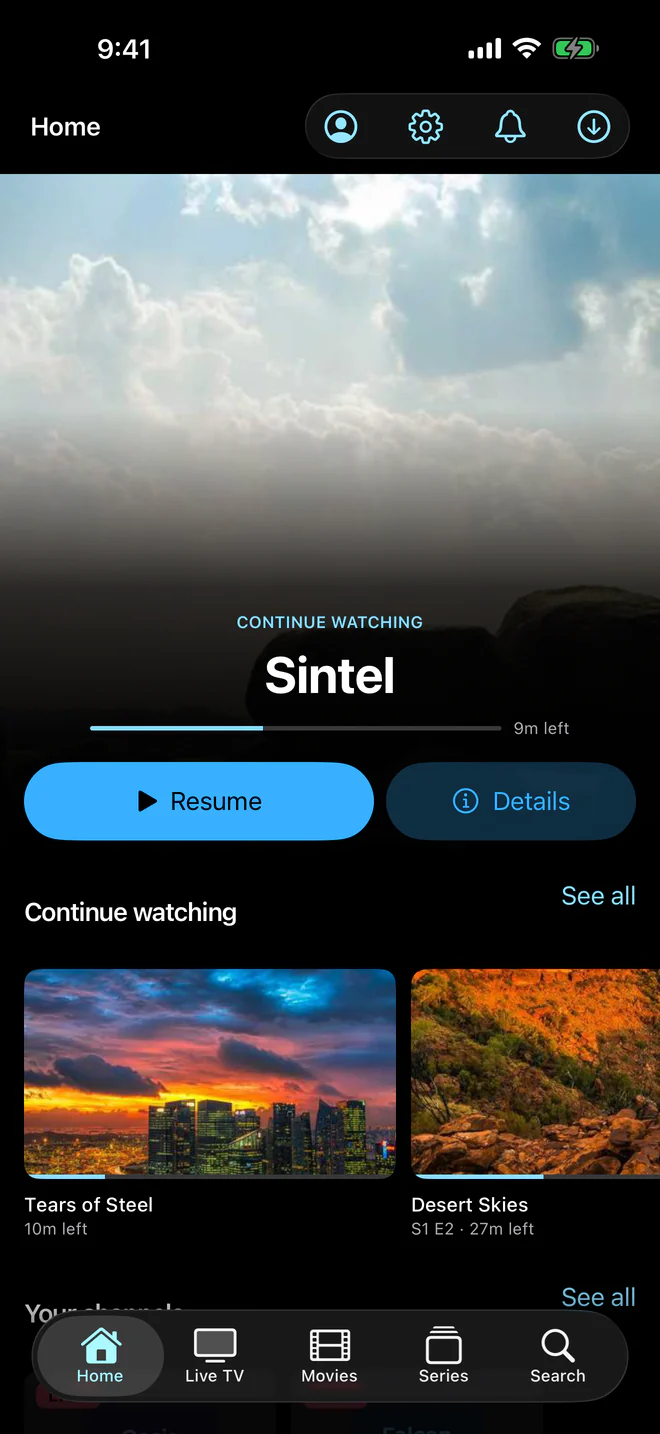
The same line should work on your iPhone in bed, your iPad on the sofa and your television on a Friday night. Aina is one app for iPhone and iPad, Android phones and tablets, Apple TV and Android TV and Google TV. On a phone it uses the system’s own buttons, menus, fields and alerts, and its text grows with the size you chose in Settings. On a television, everything is within reach of the remote, in type you can read from across the room.
6. A real player, not a video box
- Drag the timeline, double-tap to skip, and swipe for volume and brightness.
- Choose the audio track and the subtitles, and set the languages you prefer once.
- Playback speed, picture size, a sleep timer and a control lock.
- Channel up and down without leaving the picture, and the next episode starting by itself.
- Pause a live channel that comes as MPEG-TS and play on from where you paused, with a button back to live.
- Multi-view: up to four live channels at once, one of them heard.
- Picture in Picture on phones and tablets, Google Cast to a television, and AirPlay on iPhone and iPad for HLS and MP4 streams.
- Reconnects by itself when a stream drops.
7. Offline when you need it
On iPhone, iPad and Android phones and tablets, Aina downloads films and episodes to watch without a connection, a whole season in one go if you like, where your provider allows it. Downloads pause and resume, and can be saved to a folder or shared. The library itself is kept on the device too, so you can browse it on a plane.
8. Your login, handled openly
An IPTV player holds your provider’s password, which is often written into your playlist link as well, so it should say plainly where it goes. Aina needs no account and shows no ads. Your password is encrypted on the device, with a key kept in its keychain. So that your favourites, where you stopped and your arrangement follow the subscription to your other devices, our service keeps its password too, encrypted with a key only the service holds, and hands that data only to a device that signs in with the same password; the support team can read it to help you, and each time is recorded. The privacy policy says all of it.
9. One app for the whole house
Everyone watching a subscription can have a profile of their own, with their own favourites, history and Continue watching, and a child’s profile shows only the categories chosen for it and is left only with the parental PIN. Any category can be locked behind a PIN, and categories and channels can be hidden, renamed and put in groups of your own.
10. Honest about what it is
The best IPTV player is a player. Aina sells no subscription, comes with no channels and never pretends otherwise: it plays the service you already have. To see it at work before you add anything, Try it without a subscription on the first screen, on Android and Android TV, plays a free, public cooking channel from the iptv-org catalogue. Is IPTV legal? explains why that difference matters.
The checklist, at a glance
| What to check | Why it matters | Aina |
|---|---|---|
| Plays TS and MKV, not only HLS | Most providers send them | Yes, with libVLC on every platform |
| Xtream Codes, M3U and MAC portals | Providers use one or the other | All three, as many as you like |
| An XMLTV guide, with catch-up | Live TV without a guide is guesswork | Now and next, tonight, a week per channel, catch-up |
| Huge playlists | Big lines freeze weaker apps | Tested with 300,000 entries |
| Phone, tablet and TV | One line, every screen | iPhone, iPad, Android, Apple TV, Android TV |
| Offline viewing | Flights and commutes | Downloads on phones and tablets |
| No account, no ads | Your login is sensitive | Neither, and the privacy policy says where your password goes |
| Profiles | A house shares one app | Up to six for each subscription, and children’s profiles |
| A fair trial | See it on your own line first | 7 days free, every feature open |
Try it on your own line
No list can tell you how a player copes with your provider, so try it. Aina is free for seven days with every feature open, and browsing is always free. After that it is $3.99 a month, $19.99 a year, or $49.99 once for life. See the plans, read every feature first, or see how Aina compares with other players.
Questions and answers
The one that plays your provider’s streams reliably, reads your guide, copes with the size of your line and works on every screen you watch on. Aina is built to that list: it plays every stream with libVLC, takes Xtream Codes, M3U and MAC portals, and runs on iPhone, iPad, Android, Apple TV and Android TV.
Many are free with ads or with limits. Aina shows no ads: browsing is free, the first seven days are free with every feature open, and then a plan starts at $3.99 a month, or $49.99 once for life.
Aina runs on both, as well as on iPhone, iPad and Android phones and tablets, with a layout made for the remote on each television.
A player plays the subscription you bring from a provider of your choosing. Aina includes no content and sells none.