'/%3e%3c/clipPath%3e%3cclipPath%20id='back'%3e%3crect%20x='-2000'%20y='-2000'%20width='4000'%20height='2004'%20transform='rotate(-30)'/%3e%3c/clipPath%3e%3cmask%20id='under-front'%20maskUnits='userSpaceOnUse'%20x='-490'%20y='-524'%20width='980'%20height='848'%3e%3crect%20x='-490'%20y='-524'%20width='980'%20height='848'%20fill='%23fff'/%3e%3cg%20clip-path='url(%23front)'%3e%3cpath%20transform='rotate(-30)'%20d='M-536%200%20A536%20166%200%201%200%20536%200%20A536%20166%200%201%200%20-536%200%20Z%20M-464%20-28%20A464%2094%200%201%200%20464%20-28%20A464%2094%200%201%200%20-464%20-28%20Z'%20fill-rule='evenodd'%20fill='%23000'%20stroke='%23000'%20stroke-width='64'/%3e%3c/g%3e%3c/mask%3e%3cmask%20id='behind-play'%20maskUnits='userSpaceOnUse'%20x='-490'%20y='-524'%20width='980'%20height='848'%3e%3crect%20x='-490'%20y='-524'%20width='980'%20height='848'%20fill='%23fff'/%3e%3cpath%20d='M-310%20-454.449%20A50%2050%200%200%201%20-235%20-497.75%20L275%20-203.301%20A50%2050%200%200%201%20275%20-116.699%20L-235%20177.75%20A50%2050%200%200%201%20-310%20134.449%20L-310%20-454.449%20Z'%20fill='%23000'%20stroke='%23000'%20stroke-width='64'%20stroke-linejoin='round'/%3e%3c/mask%3e%3c/defs%3e%3cpath%20d='M-310%20-454.449%20A50%2050%200%200%201%20-235%20-497.75%20L275%20-203.301%20A50%2050%200%200%201%20275%20-116.699%20L-235%20177.75%20A50%2050%200%200%201%20-310%20134.449%20L-310%20-454.449%20Z'%20fill='url(%23play)'%20mask='url(%23under-front)'/%3e%3cg%20mask='url(%23behind-play)'%3e%3cg%20clip-path='url(%23back)'%3e%3cpath%20transform='rotate(-30)'%20d='M-536%200%20A536%20166%200%201%200%20536%200%20A536%20166%200%201%200%20-536%200%20Z%20M-464%20-28%20A464%2094%200%201%200%20464%20-28%20A464%2094%200%201%200%20-464%20-28%20Z'%20fill-rule='evenodd'%20fill='url(%23orbit)'/%3e%3c/g%3e%3c/g%3e%3cg%20clip-path='url(%23front)'%3e%3cpath%20transform='rotate(-30)'%20d='M-536%200%20A536%20166%200%201%200%20536%200%20A536%20166%200%201%200%20-536%200%20Z%20M-464%20-28%20A464%2094%200%201%200%20464%20-28%20A464%2094%200%201%200%20-464%20-28%20Z'%20fill-rule='evenodd'%20fill='url(%23orbit)'/%3e%3c/g%3e%3c/svg%3e)
TV guide (EPG)
An IPTV TV guide you will actually use
An electronic programme guide, the EPG, is what turns a list of channels into television. Aina reads your provider’s XMLTV guide and puts it everywhere it helps: under each channel, across your whole line, and in the player.
Updated · By the Aina IPTV team
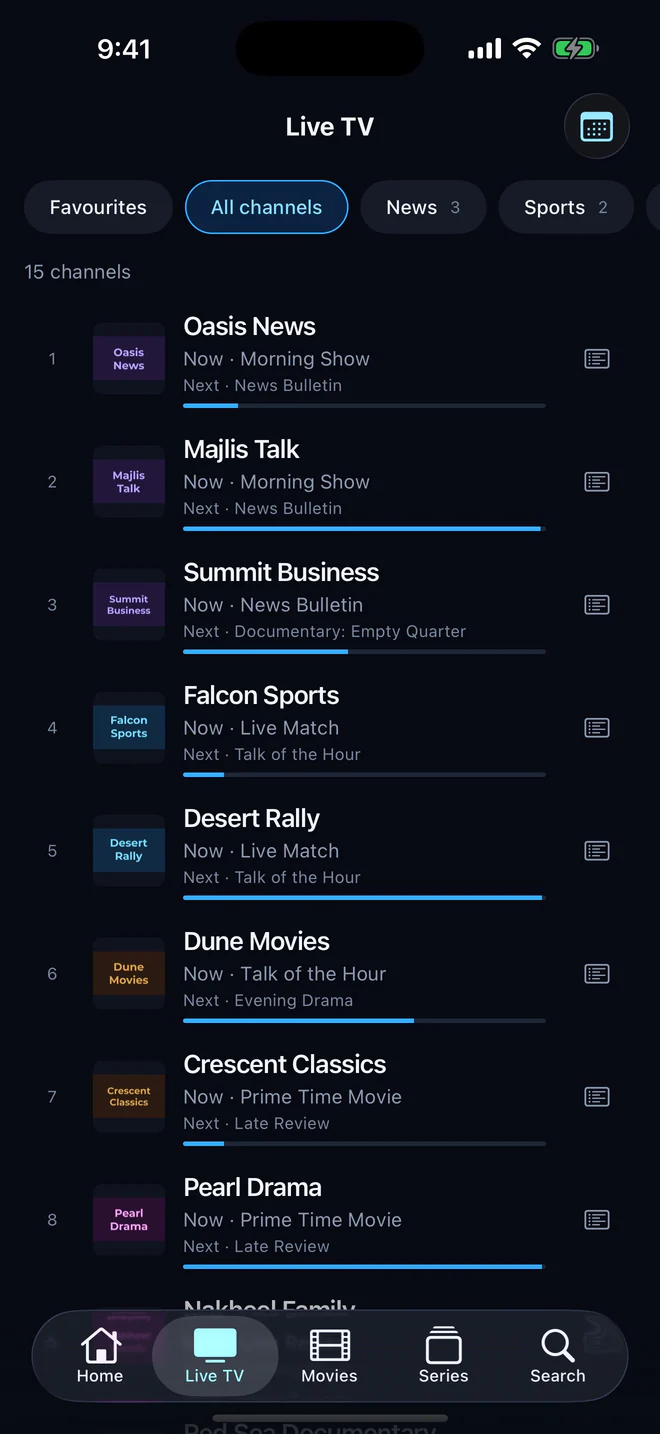
Everywhere you look
- On Live TV: what is on now and what is next under every channel, with a bar showing how far through it is.
- In the guide: what is on now and what starts in the rest of the hour, then each hour of tonight and the days after. Chips choose when it starts and which categories it covers, and a search finds any programme by its title.
- On each channel: a week’s schedule, opening on what is on air rather than at the top of the week.
- On Home: what is on now, a tap from playing.
Catch-up
Where your provider keeps an archive, programmes that have already aired are marked in the schedule and play from their start: through the archive of an Xtream Codes line, or the catch-up attributes of an M3U playlist. How many days back you can go is your provider’s choice.
Where the guide comes from
- An Xtream Codes login brings its guide with it: Aina fetches it from the panel, and there is nothing to set up.
- An M3U playlist often names its guide in its first line, and Aina finds it. If it does not, add the guide link your provider gave you when you add the playlist.
- Either kind of guide can be plain XMLTV (
.xml) or compressed (.xml.gz).
Step by step, and why a guide can come up empty: How to add a TV guide (EPG).
Matched to the right channels
An XMLTV guide lists programmes by channel id, and a playlist names the id it uses for each channel. Aina matches the two, and where a channel has no id, or the guide does not use it, it matches by the channel’s name instead, so more of your line has a schedule.
Big guides, handled
A week of guide for a big provider can run to hundreds of megabytes, the largest download an IPTV app makes. Aina writes it to storage as it arrives and reads it back a piece at a time, so a guide that size does not exhaust the memory of a phone or a television box.
On the big screen
On Apple TV and Android TV, the guide is laid out for the remote: move through the hours and the categories with the arrows, and press to play what is on or to open a channel’s week.
Questions and answers
The electronic programme guide: the schedule of what is on each channel. IPTV providers publish it as an XMLTV file, which a player reads and shows beside the channels.
Usually because the guide does not cover those channels, or its channel ids do not match the playlist’s. With an M3U playlist, check that you added a guide link. How to add a TV guide has the full list.
Only on the channels your provider archives, and only as many days back as it keeps them. Aina marks those programmes in the schedule.