'/%3e%3c/clipPath%3e%3cclipPath%20id='back'%3e%3crect%20x='-2000'%20y='-2000'%20width='4000'%20height='2004'%20transform='rotate(-30)'/%3e%3c/clipPath%3e%3cmask%20id='under-front'%20maskUnits='userSpaceOnUse'%20x='-490'%20y='-524'%20width='980'%20height='848'%3e%3crect%20x='-490'%20y='-524'%20width='980'%20height='848'%20fill='%23fff'/%3e%3cg%20clip-path='url(%23front)'%3e%3cpath%20transform='rotate(-30)'%20d='M-536%200%20A536%20166%200%201%200%20536%200%20A536%20166%200%201%200%20-536%200%20Z%20M-464%20-28%20A464%2094%200%201%200%20464%20-28%20A464%2094%200%201%200%20-464%20-28%20Z'%20fill-rule='evenodd'%20fill='%23000'%20stroke='%23000'%20stroke-width='64'/%3e%3c/g%3e%3c/mask%3e%3cmask%20id='behind-play'%20maskUnits='userSpaceOnUse'%20x='-490'%20y='-524'%20width='980'%20height='848'%3e%3crect%20x='-490'%20y='-524'%20width='980'%20height='848'%20fill='%23fff'/%3e%3cpath%20d='M-310%20-454.449%20A50%2050%200%200%201%20-235%20-497.75%20L275%20-203.301%20A50%2050%200%200%201%20275%20-116.699%20L-235%20177.75%20A50%2050%200%200%201%20-310%20134.449%20L-310%20-454.449%20Z'%20fill='%23000'%20stroke='%23000'%20stroke-width='64'%20stroke-linejoin='round'/%3e%3c/mask%3e%3c/defs%3e%3cpath%20d='M-310%20-454.449%20A50%2050%200%200%201%20-235%20-497.75%20L275%20-203.301%20A50%2050%200%200%201%20275%20-116.699%20L-235%20177.75%20A50%2050%200%200%201%20-310%20134.449%20L-310%20-454.449%20Z'%20fill='url(%23play)'%20mask='url(%23under-front)'/%3e%3cg%20mask='url(%23behind-play)'%3e%3cg%20clip-path='url(%23back)'%3e%3cpath%20transform='rotate(-30)'%20d='M-536%200%20A536%20166%200%201%200%20536%200%20A536%20166%200%201%200%20-536%200%20Z%20M-464%20-28%20A464%2094%200%201%200%20464%20-28%20A464%2094%200%201%200%20-464%20-28%20Z'%20fill-rule='evenodd'%20fill='url(%23orbit)'/%3e%3c/g%3e%3c/g%3e%3cg%20clip-path='url(%23front)'%3e%3cpath%20transform='rotate(-30)'%20d='M-536%200%20A536%20166%200%201%200%20536%200%20A536%20166%200%201%200%20-536%200%20Z%20M-464%20-28%20A464%2094%200%201%200%20464%20-28%20A464%2094%200%201%200%20-464%20-28%20Z'%20fill-rule='evenodd'%20fill='url(%23orbit)'/%3e%3c/g%3e%3c/svg%3e)
Android TV and Google TV
An IPTV player for Android TV and Google TV
Aina puts your IPTV line on the television you already have: every channel, the guide, and your films and series, laid out for the remote and readable from the sofa.
Updated · By the Aina IPTV team
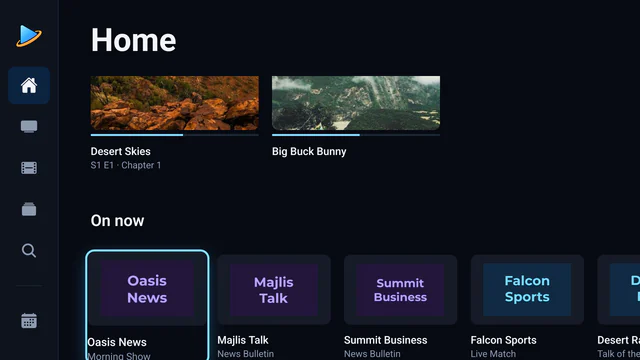
Made for the remote
- A focus rail down the side, ten-foot type, and a clear edge on whatever the remote is on.
- Every control reachable with the arrows, OK and Back: no mouse, no touch screen.
- Change channel and seek with the arrows, without leaving the picture.
- Volume and brightness in the player’s controls, moved a step at a time.
Plays what TV boxes turn down
Many boxes and televisions refuse some of the streams providers send, MKV films and some TS channels among them. Aina plays every stream with libVLC rather than leaning on the device’s own player, so a channel that plays on your phone plays on your television too.
Everything from your line
- Live TV with now and next, favourites and categories.
- The TV guide: what is on now and tonight, a programme search, a week per channel, and catch-up.
- Films and series with posters, plots, seasons and episodes, and resume where you stopped.
- Xtream Codes and M3U, as many subscriptions as you like.
- Built for big lines: tested with a 300,000-entry playlist, and a guide of hundreds of megabytes read without running a box out of memory.
Which devices
Televisions and boxes that run Android TV or Google TV with Android 7.0 or later and Google Play: Chromecast with Google TV, Google TV Streamer, NVIDIA Shield TV, and the many televisions with Google TV or Android TV built in.
Set it up
- 1
Get Aina from Google Play
On the television itself. Aina is coming to Google Play soon.
- 2
Add your subscription
Choose Xtream Codes or M3U playlist and type in what your provider sent. You can leave out
http://: Aina adds it. - 3
Type it the easy way
On Google TV, the Google TV app on your phone has a remote with a keyboard, which types into the field on the television.
- 4
Watch
Your library fills in as it loads, and opens straight away after that.
Questions and answers
One built for the remote that plays every stream your provider sends and handles the size of your line. Aina is made for exactly that, with a TV guide, catch-up, films and series, and a 7-day free trial.
Yes. Chromecast with Google TV and Google TV Streamer run Google TV, and Aina installs on them from Google Play.
Not yet. Fire TV uses Amazon’s own store, which Aina is not in. Android TV and Google TV devices are supported.
No. Everything works with the remote. A phone’s keyboard only makes typing a long address quicker.