'/%3e%3c/clipPath%3e%3cclipPath%20id='back'%3e%3crect%20x='-2000'%20y='-2000'%20width='4000'%20height='2004'%20transform='rotate(-30)'/%3e%3c/clipPath%3e%3cmask%20id='under-front'%20maskUnits='userSpaceOnUse'%20x='-490'%20y='-524'%20width='980'%20height='848'%3e%3crect%20x='-490'%20y='-524'%20width='980'%20height='848'%20fill='%23fff'/%3e%3cg%20clip-path='url(%23front)'%3e%3cpath%20transform='rotate(-30)'%20d='M-536%200%20A536%20166%200%201%200%20536%200%20A536%20166%200%201%200%20-536%200%20Z%20M-464%20-28%20A464%2094%200%201%200%20464%20-28%20A464%2094%200%201%200%20-464%20-28%20Z'%20fill-rule='evenodd'%20fill='%23000'%20stroke='%23000'%20stroke-width='64'/%3e%3c/g%3e%3c/mask%3e%3cmask%20id='behind-play'%20maskUnits='userSpaceOnUse'%20x='-490'%20y='-524'%20width='980'%20height='848'%3e%3crect%20x='-490'%20y='-524'%20width='980'%20height='848'%20fill='%23fff'/%3e%3cpath%20d='M-310%20-454.449%20A50%2050%200%200%201%20-235%20-497.75%20L275%20-203.301%20A50%2050%200%200%201%20275%20-116.699%20L-235%20177.75%20A50%2050%200%200%201%20-310%20134.449%20L-310%20-454.449%20Z'%20fill='%23000'%20stroke='%23000'%20stroke-width='64'%20stroke-linejoin='round'/%3e%3c/mask%3e%3c/defs%3e%3cpath%20d='M-310%20-454.449%20A50%2050%200%200%201%20-235%20-497.75%20L275%20-203.301%20A50%2050%200%200%201%20275%20-116.699%20L-235%20177.75%20A50%2050%200%200%201%20-310%20134.449%20L-310%20-454.449%20Z'%20fill='url(%23play)'%20mask='url(%23under-front)'/%3e%3cg%20mask='url(%23behind-play)'%3e%3cg%20clip-path='url(%23back)'%3e%3cpath%20transform='rotate(-30)'%20d='M-536%200%20A536%20166%200%201%200%20536%200%20A536%20166%200%201%200%20-536%200%20Z%20M-464%20-28%20A464%2094%200%201%200%20464%20-28%20A464%2094%200%201%200%20-464%20-28%20Z'%20fill-rule='evenodd'%20fill='url(%23orbit)'/%3e%3c/g%3e%3c/g%3e%3cg%20clip-path='url(%23front)'%3e%3cpath%20transform='rotate(-30)'%20d='M-536%200%20A536%20166%200%201%200%20536%200%20A536%20166%200%201%200%20-536%200%20Z%20M-464%20-28%20A464%2094%200%201%200%20464%20-28%20A464%2094%200%201%200%20-464%20-28%20Z'%20fill-rule='evenodd'%20fill='url(%23orbit)'/%3e%3c/g%3e%3c/svg%3e)
Features
Every feature of Aina IPTV
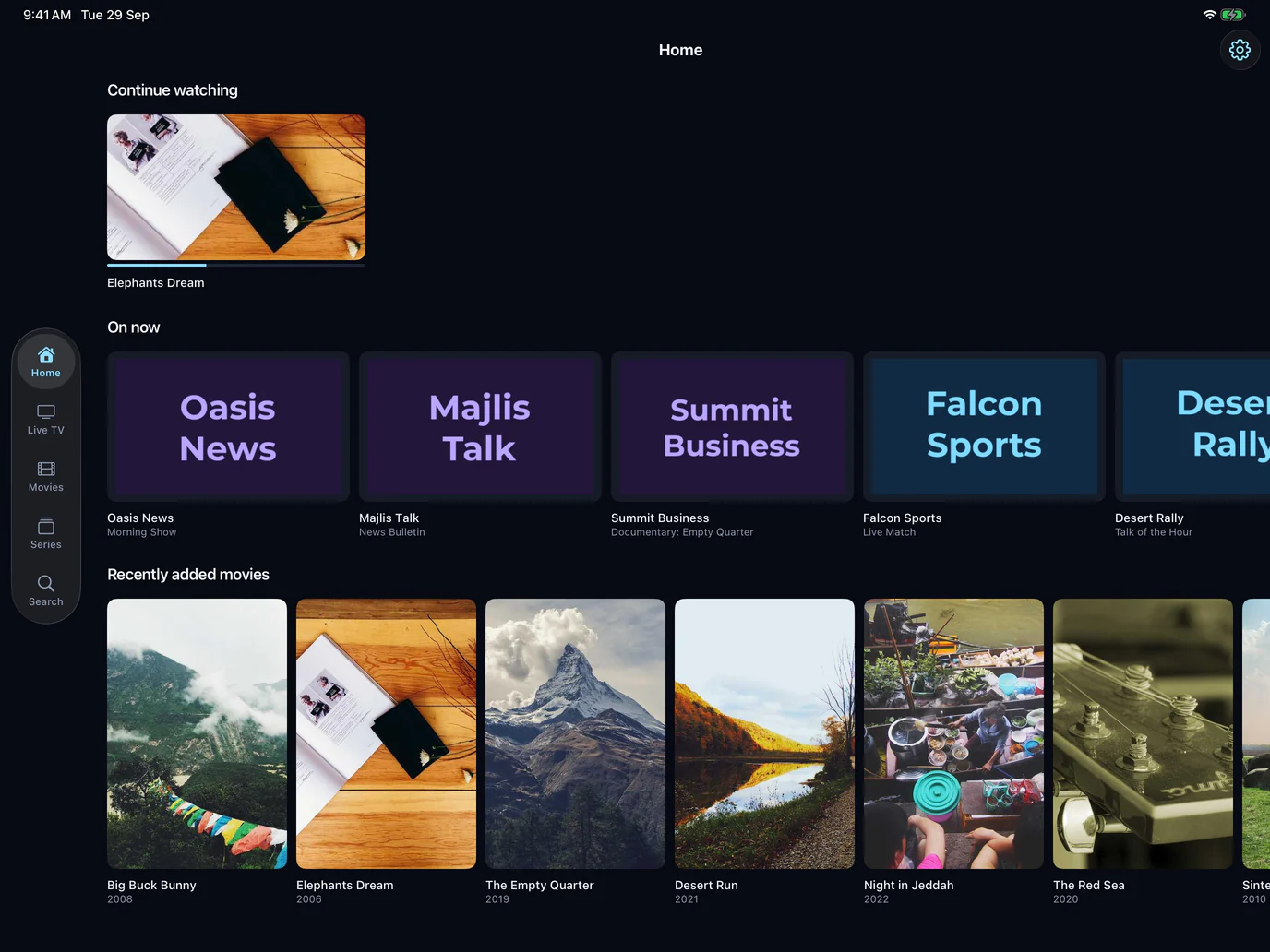
Aina is an IPTV player for the subscription you already have. This is everything it does, on every screen it runs on, and the few things it does not do yet.
Updated · By the Aina IPTV team
Your subscriptions
- Xtream Codes: sign in with the server URL, username and password your provider sent. How to sign in.
- M3U and M3U8 playlists: paste the playlist’s link, with an XMLTV guide link if you have one. How to add one.
- As many as you like: there is no limit on how many subscriptions Aina keeps. Name each one, and move between them in a tap.
- See where each line stands: a subscription’s expiry date, where the provider gives one.
- Try it first: “Try it without a subscription” fills the app with free, public channels from the iptv-org catalogue on GitHub.
Live TV
- Every channel with its logo, number and category, and the category chips to move between them.
- Now and next from your guide under each channel, with a progress bar.
- Favourites, on a chip of their own.
- Channel up and down from inside the player, without going back to the list.
The TV guide
- What is on now and what starts in the rest of the hour, then each hour of tonight and the days after.
- Chips for the time it starts from and the categories it covers, and a search for any programme by its title.
- A week’s schedule for every channel, opening on what is on air.
- Catch-up: programmes that have already aired play from the start, where your provider keeps an archive.
- XMLTV guides, plain
.xmlor compressed.xml.gz, matched to your channels by their guide ids and, where a channel has none, by name. More about the guide.
Films and series
- Posters, plot, cast, rating and running time, wherever your provider supplies them.
- Seasons and episodes, with the next episode starting by itself.
- Resume exactly where you stopped, and Continue watching on Home.
- Sort by newest, name or year.
Search
One search across live TV, films and series at once. Your last five searches are offered again from the first letter you type.
The player
- Built on libVLC, the engine of VideoLAN’s VLC: HLS (M3U8), MPEG-TS, MP4, MKV and AVI play in the same player.
- Drag the timeline, double-tap to skip, and swipe for brightness on one side and volume on the other.
- Audio tracks and subtitles, with preferred languages set once.
- Playback speed, picture size, a sleep timer and a control lock.
- Picture in Picture on iPhone, iPad and Android phones and tablets.
- Google Cast to a Chromecast or a television with Chromecast built in, from phones and tablets.
- Reconnects by itself when a stream drops.
Downloads
- Download films and episodes on iPhone, iPad and Android phones and tablets, and watch them without a connection, where your provider allows it.
- A whole season, or every season, in one go: episodes download one at a time, in order.
- Pause and resume any download, and save a finished one to a folder or share it.
- On a line that allows one connection at a time, a download waits while you watch and carries on when you stop.
- Downloads stay out of iCloud and computer backups, so a film never fills someone’s cloud storage.
On television
- Apple TV, driven by the Siri Remote, and Android TV and Google TV, driven by the remote.
- A focus rail down the side, ten-foot type, and every control reachable without a mouse or a touch screen.
- Seek and change channel with the remote’s arrows.
- Volume and brightness in the player’s controls, as two bars the remote moves a step at a time.
Privacy and control
- No account, and no ads.
- Your password is encrypted on the device, with a key in its keychain, and goes to nobody but your provider.
- Parental controls: lock any category behind a PIN.
- Delete everything Aina keeps on the device, in one tap, from Settings.
- What the app tells its own service, and what it never does, is in the privacy policy.
Built for big lines
Aina is tested with a playlist of 300,000 entries. It loads a big line in batches and shows your library as it goes, keeps it on the device so it opens straight away next time, and lets you browse it offline. A slow server is given time: a download gives up only after three minutes without a byte, never at a fixed timeout, so a big list from a busy panel arrives whole.
In English and Arabic
The whole app is in English and Arabic, laid out right to left in Arabic rather than translated over an English layout, and the language changes without a restart.
Accessibility
Text follows the size you set on your device, up to the largest, and rows grow to hold it rather than cutting it short. Every control has a label for VoiceOver and TalkBack, messages that appear by themselves are read aloud, and every tap target is at least 44 points.
Price
Browsing is always free: signing in, the library, search and the guide. Playing needs the free 7-day trial or the full version: $3.99 a month, $19.99 a year, or $49.99 once for life. See the plans.
Questions and answers
Not yet. Where your provider keeps an archive, catch-up replays programmes that have already aired, and films and episodes can be downloaded on phones and tablets.
No. Aina needs no account, so each device keeps its own: add your subscription on each one. Purchases follow your Apple or Google account and restore on any device signed in to it.
Your library stays on the device and can be browsed without a connection, and anything you downloaded plays. Live TV needs a connection.