'/%3e%3c/clipPath%3e%3cclipPath%20id='back'%3e%3crect%20x='-2000'%20y='-2000'%20width='4000'%20height='2004'%20transform='rotate(-30)'/%3e%3c/clipPath%3e%3cmask%20id='under-front'%20maskUnits='userSpaceOnUse'%20x='-490'%20y='-524'%20width='980'%20height='848'%3e%3crect%20x='-490'%20y='-524'%20width='980'%20height='848'%20fill='%23fff'/%3e%3cg%20clip-path='url(%23front)'%3e%3cpath%20transform='rotate(-30)'%20d='M-536%200%20A536%20166%200%201%200%20536%200%20A536%20166%200%201%200%20-536%200%20Z%20M-464%20-28%20A464%2094%200%201%200%20464%20-28%20A464%2094%200%201%200%20-464%20-28%20Z'%20fill-rule='evenodd'%20fill='%23000'%20stroke='%23000'%20stroke-width='64'/%3e%3c/g%3e%3c/mask%3e%3cmask%20id='behind-play'%20maskUnits='userSpaceOnUse'%20x='-490'%20y='-524'%20width='980'%20height='848'%3e%3crect%20x='-490'%20y='-524'%20width='980'%20height='848'%20fill='%23fff'/%3e%3cpath%20d='M-310%20-454.449%20A50%2050%200%200%201%20-235%20-497.75%20L275%20-203.301%20A50%2050%200%200%201%20275%20-116.699%20L-235%20177.75%20A50%2050%200%200%201%20-310%20134.449%20L-310%20-454.449%20Z'%20fill='%23000'%20stroke='%23000'%20stroke-width='64'%20stroke-linejoin='round'/%3e%3c/mask%3e%3c/defs%3e%3cpath%20d='M-310%20-454.449%20A50%2050%200%200%201%20-235%20-497.75%20L275%20-203.301%20A50%2050%200%200%201%20275%20-116.699%20L-235%20177.75%20A50%2050%200%200%201%20-310%20134.449%20L-310%20-454.449%20Z'%20fill='url(%23play)'%20mask='url(%23under-front)'/%3e%3cg%20mask='url(%23behind-play)'%3e%3cg%20clip-path='url(%23back)'%3e%3cpath%20transform='rotate(-30)'%20d='M-536%200%20A536%20166%200%201%200%20536%200%20A536%20166%200%201%200%20-536%200%20Z%20M-464%20-28%20A464%2094%200%201%200%20464%20-28%20A464%2094%200%201%200%20-464%20-28%20Z'%20fill-rule='evenodd'%20fill='url(%23orbit)'/%3e%3c/g%3e%3c/g%3e%3cg%20clip-path='url(%23front)'%3e%3cpath%20transform='rotate(-30)'%20d='M-536%200%20A536%20166%200%201%200%20536%200%20A536%20166%200%201%200%20-536%200%20Z%20M-464%20-28%20A464%2094%200%201%200%20464%20-28%20A464%2094%200%201%200%20-464%20-28%20Z'%20fill-rule='evenodd'%20fill='url(%23orbit)'/%3e%3c/g%3e%3c/svg%3e)
M3U player
An M3U player that sorts your playlist for you
Paste the link to your M3U or M3U8 playlist and Aina does the rest: it downloads the list, sorts it into live TV, films and series, finds its guide, and keeps it on your device so it opens straight away next time.
Updated · By the Aina IPTV team
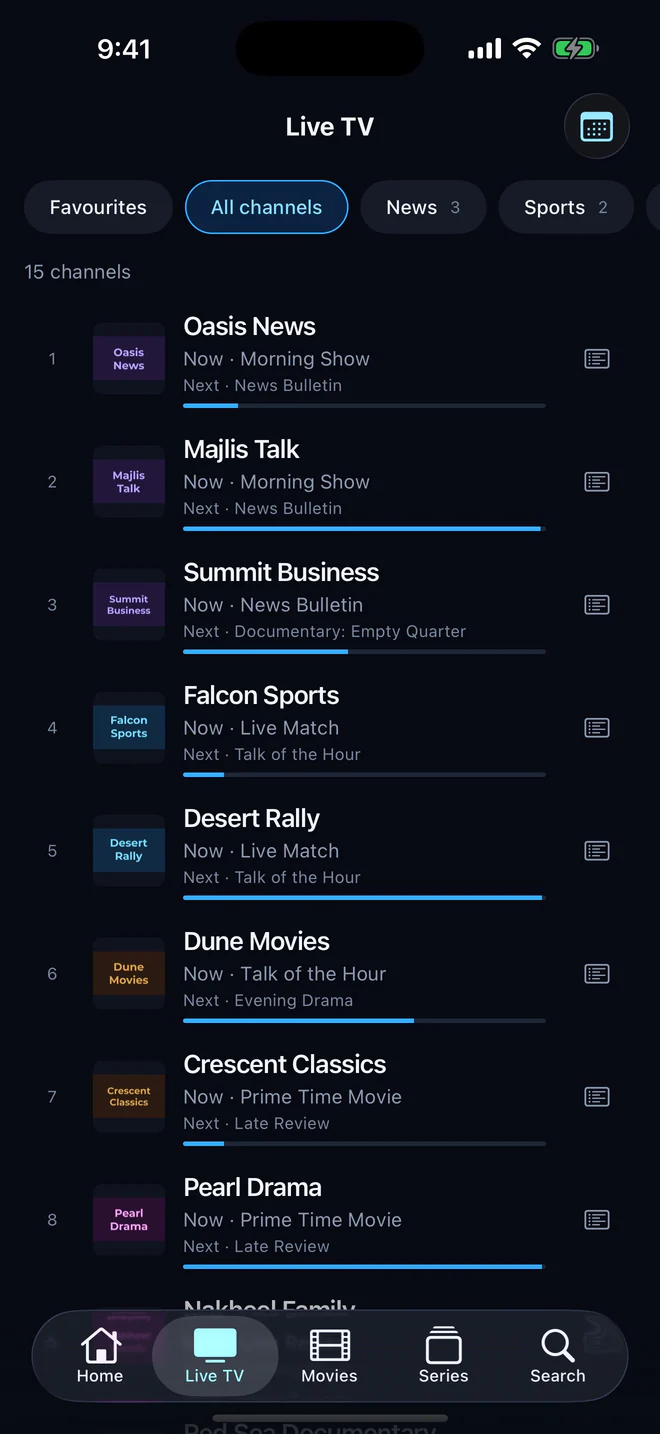
What Aina does with your playlist
- Sorts it. Each entry becomes a live channel, a film or an episode of a series, worked out from its address, its group and episode numbers such as S01E02. Groups become the categories you browse by.
- Keeps its logos and names. Channel logos (
tvg-logo), names and groups come straight from the list. - Finds its guide. When the playlist names a guide in its header (
url-tvgorx-tvg-url), Aina loads it. You can add a guide link of your own as well,.xmlor.xml.gz. - Plays catch-up. Channels that carry catch-up attributes (
catchup,catchup-days,catchup-source) replay what has already aired. - Drops duplicates. The same stream listed twice is kept once.
Made for big playlists
An M3U file from a large provider runs to hundreds of thousands of lines and tens of megabytes. Aina reads it a piece at a time and stores each batch before the next, so the app’s memory stays flat and your library appears while the rest is still arriving. It is tested with a playlist of 300,000 entries. A slow server is given time, too: the download gives up only after three minutes without a byte, so a big list from a busy server arrives whole instead of cut off half way.
M3U, M3U8 and what plays
M3U and M3U8 playlists are the same kind of list: a plain text file of entries, each with a name, some attributes and a stream address. The 8 says the text is UTF-8, which matters for channel names in other alphabets. Confusingly, HLS streams are also described by .m3u8 files. Aina reads both kinds of playlist, and its player, built on libVLC, plays the streams inside them, whether they are HLS, MPEG-TS, MP4 or MKV. The glossary has the rest of the words.
Add a playlist in a minute
- 1
Choose M3U playlist
On the first screen, Add your subscription, pick the M3U playlist tab. Already signed in? Settings, then Subscriptions, then Add a subscription.
- 2
Paste the link
Paste the playlist URL your provider sent into Playlist URL, and a guide link into Guide URL if you have one.
- 3
Connect
Name it if you like, and tap Connect. Your channels appear as they load.
The full walk-through, with what to do when a playlist will not load, is in How to add an M3U playlist.
On every screen
The same playlist works on iPhone and iPad, Android, Apple TV and Android TV. Each device keeps its own copy of the list, so add it on each one you watch on.
Questions and answers
Aina’s first seven days are free with every feature open, and browsing is always free. After that a plan starts at $3.99 a month, or $49.99 once for life.
Yes, as many as you like, alongside Xtream Codes logins, and move between them in a tap.
Either the playlist names no guide, or the guide’s channels do not match the playlist’s. Add a guide URL from your provider, and see How to add a TV guide.
No. Aina is a player: the playlist comes from your IPTV provider. To look around first, Try it without a subscription loads free, public channels.