
Aina vs TiviMate
Aina vs TiviMate: which IPTV player fits your home
TiviMate is one of the best-known IPTV players for Android TV, and for good reason. If you are looking for a TiviMate alternative, most often it is because a screen in your home is not an Android TV: an Apple TV, an iPhone, an iPad, or an Android phone. This page sets the two side by side, says where TiviMate is the better choice, and takes everything it says about TiviMate from TiviMate’s own Google Play listing, as it stood on 20 November 2026.
Updated · By the Aina IPTV team
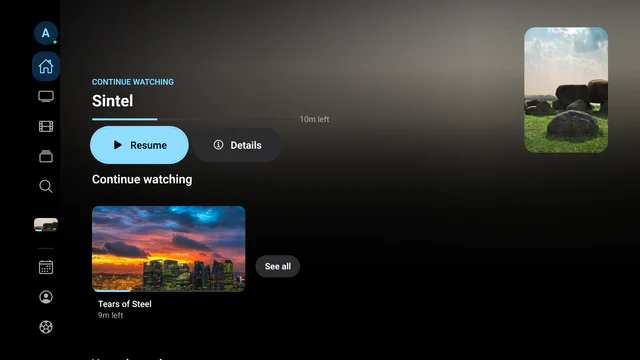
Aina and TiviMate at a glance
| TiviMate | Aina | |
|---|---|---|
| Where it runs | Android TV. Its listing says it is made for the remote and not optimised for phones or tablets. Not on the App Store | iPhone, iPad, Android phones and tablets, Apple TV, Android TV and Google TV, each with its own layout |
| Kinds of subscription | M3U, Xtream Codes and Stalker portals | Xtream Codes, M3U playlists and MAC (Stalker) portals |
| Several playlists | Yes | Yes, as many as you like |
| TV guide (EPG) | A full programme grid | A grid on tablets and televisions, now and next on phones, a programme search, and guides of your own |
| Catch-up | Yes | Yes, where your provider keeps an archive |
| Recording | Yes | No |
| Multi-view | Yes | Two to four channels, never more than your line’s connections |
| Parental controls | Yes | A PIN lock on categories, and up to six profiles, children’s among them |
| Films and series | Not among the features its listing names | Libraries with plots, ratings and trailers, and downloads to watch offline on phones and tablets |
| Price | Free to install; in-app purchases from $0.99 to $33.99 per item on Google Play | Browsing free; a 7-day free trial, then $3.99 a month, $19.99 a year or $49.99 once |
| Languages | Not stated on its listing | Eleven, Arabic laid out right to left |
Where TiviMate is the better choice
Be honest with yourself about what you watch. If every screen in your home is an Android TV or a Google TV, and you want to record live TV, TiviMate does it and Aina does not. Its listing also puts a fast programme grid at the heart of the app, built for the remote, and many people have used it that way for years. If that is all you need, keep it.
Where Aina is the better choice
- Apple TV, iPhone and iPad. TiviMate is not on the App Store; the apps with similar names there are made by other developers. Aina is on the App Store for all three, as one purchase.
- Phones and tablets. TiviMate’s listing says it is not optimised for touch. Aina on a phone uses the system’s own buttons, menus and fields, and adds Picture in Picture, Google Cast and downloads to watch offline.
- A home with more than one kind of device. An iPhone, an Android tablet and an Android TV all run the same Aina, with the same subscription, favourites and place in a film, carried between them.
- Films and series. Pages for each film and series with plots, ratings and trailers, Continue watching, and the next episode by itself.
- Every stream on every platform. Aina plays with libVLC, VLC’s engine, on Apple’s devices and Android alike: MPEG-TS channels and MKV films included.
- Your language. The app speaks eleven languages, and Arabic is laid out right to left.
Switching from TiviMate to Aina
You do not need to give anything up to try: the same subscription works in both.
- 1
Find your subscription details
Your provider sent them: an Xtream Codes server, username and password, or the link of an M3U playlist. If you only have them inside TiviMate, ask your provider to send them again.
- 2
Install Aina
From the App Store on iPhone, iPad and Apple TV, or from Google Play on Android phones, tablets, Android TV and Google TV.
- 3
Add the subscription
Type it in, or on a television scan the QR code on the sign-in screen and type it on your phone. See how to sign in with Xtream Codes or how to add an M3U playlist.
- 4
Mind your connections
If your line allows one connection at a time, stop TiviMate before you play in Aina.
Favourites and settings do not move between two different apps: mark your favourite channels again in Aina, and they follow your subscription to every device you sign in on.
Questions and answers
Not from its developer. On 20 November 2026 the App Store had no app by Armobsoft FZE, TiviMate’s developer, only apps with similar names made by others. Aina runs on iPhone, iPad and Apple TV, with a full TV guide and catch-up.
No. Aina has catch-up where your provider keeps an archive, pausing a live channel, and downloads of films and episodes on phones and tablets, but no recording. If recording matters to you, TiviMate does it on Android TV.
Yes. Add the same Xtream Codes login or M3U link to both. Your provider decides how many streams can play at once, so on a line with one connection only one app can play at a time.
Aina is not in Amazon’s store. It runs on Android TV and Google TV from Google Play, on Apple TV, and on phones and tablets.
They are priced differently. On Google Play, TiviMate’s in-app purchases ranged from $0.99 to $33.99 per item on 20 November 2026. Aina is free to browse, free to play for seven days, and then $3.99 a month, $19.99 a year or $49.99 once for life, restored on every device signed in to the same Apple or Google account.