'/%3e%3c/clipPath%3e%3cclipPath%20id='back'%3e%3crect%20x='-2000'%20y='-2000'%20width='4000'%20height='2004'%20transform='rotate(-30)'/%3e%3c/clipPath%3e%3cmask%20id='under-front'%20maskUnits='userSpaceOnUse'%20x='-490'%20y='-524'%20width='980'%20height='848'%3e%3crect%20x='-490'%20y='-524'%20width='980'%20height='848'%20fill='%23fff'/%3e%3cg%20clip-path='url(%23front)'%3e%3cpath%20transform='rotate(-30)'%20d='M-536%200%20A536%20166%200%201%200%20536%200%20A536%20166%200%201%200%20-536%200%20Z%20M-464%20-28%20A464%2094%200%201%200%20464%20-28%20A464%2094%200%201%200%20-464%20-28%20Z'%20fill-rule='evenodd'%20fill='%23000'%20stroke='%23000'%20stroke-width='64'/%3e%3c/g%3e%3c/mask%3e%3cmask%20id='behind-play'%20maskUnits='userSpaceOnUse'%20x='-490'%20y='-524'%20width='980'%20height='848'%3e%3crect%20x='-490'%20y='-524'%20width='980'%20height='848'%20fill='%23fff'/%3e%3cpath%20d='M-310%20-454.449%20A50%2050%200%200%201%20-235%20-497.75%20L275%20-203.301%20A50%2050%200%200%201%20275%20-116.699%20L-235%20177.75%20A50%2050%200%200%201%20-310%20134.449%20L-310%20-454.449%20Z'%20fill='%23000'%20stroke='%23000'%20stroke-width='64'%20stroke-linejoin='round'/%3e%3c/mask%3e%3c/defs%3e%3cpath%20d='M-310%20-454.449%20A50%2050%200%200%201%20-235%20-497.75%20L275%20-203.301%20A50%2050%200%200%201%20275%20-116.699%20L-235%20177.75%20A50%2050%200%200%201%20-310%20134.449%20L-310%20-454.449%20Z'%20fill='url(%23play)'%20mask='url(%23under-front)'/%3e%3cg%20mask='url(%23behind-play)'%3e%3cg%20clip-path='url(%23back)'%3e%3cpath%20transform='rotate(-30)'%20d='M-536%200%20A536%20166%200%201%200%20536%200%20A536%20166%200%201%200%20-536%200%20Z%20M-464%20-28%20A464%2094%200%201%200%20464%20-28%20A464%2094%200%201%200%20-464%20-28%20Z'%20fill-rule='evenodd'%20fill='url(%23orbit)'/%3e%3c/g%3e%3c/g%3e%3cg%20clip-path='url(%23front)'%3e%3cpath%20transform='rotate(-30)'%20d='M-536%200%20A536%20166%200%201%200%20536%200%20A536%20166%200%201%200%20-536%200%20Z%20M-464%20-28%20A464%2094%200%201%200%20464%20-28%20A464%2094%200%201%200%20-464%20-28%20Z'%20fill-rule='evenodd'%20fill='url(%23orbit)'/%3e%3c/g%3e%3c/svg%3e)
Guide
How to watch IPTV on your TV
There are four good ways to get your IPTV subscription onto a television, and one of them is better than the rest. Here they are, from best to last resort.
Updated · By the Aina IPTV team
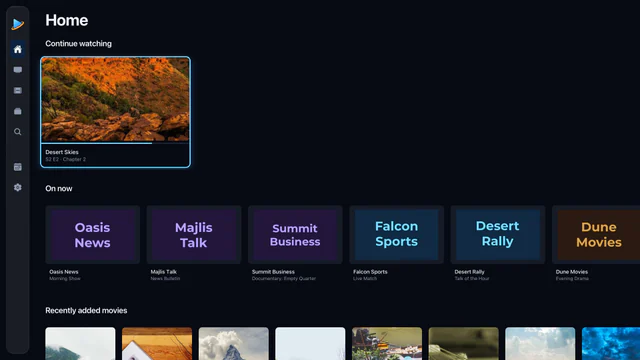
1. A player on an Apple TV
An Apple TV plugged into the television’s HDMI port runs a player of its own, so the stream goes straight from your provider to the television and your phone stays free. Aina on Apple TV has the full guide, catch-up, films and series, driven by the Siri Remote. Aina for Apple TV.
2. A player on Android TV or Google TV
Many televisions have Google TV or Android TV built in, and any television can have it through a box such as Chromecast with Google TV, Google TV Streamer or NVIDIA Shield TV. Install the player from Google Play on the television itself. Aina for Android TV and Google TV.
3. Google Cast from your phone or tablet
Start a channel or a film in Aina on an iPhone, iPad or Android device, tap the Cast button in the player and choose your Chromecast or a television with Chromecast built in. The television then fetches the stream itself, so you can put the phone down.
4. Screen mirroring
Copy your phone’s whole screen to the television: Screen Mirroring in Control Center on an iPhone or iPad sends it to an Apple TV or a television that takes AirPlay, and many Android phones can cast their screen too. It works with any app, but the picture is rarely as sharp, and the phone has to stay on and nearby.
At a glance
| Way | Picture | Phone free? | Plays every stream? |
|---|---|---|---|
| Apple TV | Best | Yes | Yes |
| Android TV or Google TV | Best | Yes | Yes |
| Google Cast | Good | Yes | Not always |
| Screen mirroring | Fair | No | Yes |
What about Samsung, LG and Fire TV?
- Samsung and LG televisions run their own systems, Tizen and webOS, and Aina has no app for them. Plug an Apple TV or a Google TV device into one, or cast to it if it has Chromecast built in.
- Amazon Fire TV uses Amazon’s own store, which Aina is not in today.
Questions and answers
A player app on the television itself, through an Apple TV or an Android TV or Google TV device. The picture is best, every stream plays, and your phone stays free.
If the television has Google TV or Android TV built in, yes: install the player from Google Play. Samsung and LG televisions need a box or Chromecast.
Yes, with Google Cast from Aina on iPhone, iPad and Android, to a Chromecast or a television with Chromecast built in. Some formats do not cast.