
Guide
IPTV on a Samsung or LG smart TV
Samsung and LG make most of the televisions in people’s homes, and both run systems of their own. Aina does not run on them, but your television can still show your IPTV subscription, with a remote and a TV guide. Here are the ways, best first.
Updated · By the Aina IPTV team
Is there an Aina app for Samsung or LG?
No. Samsung’s smart TVs run Tizen and LG’s run webOS, each with its own app store and neither with Google Play. Aina is offered on Google Play and the App Store, so it cannot be installed on a Samsung or LG television itself.
What every one of those televisions has is HDMI ports, and that is the way in. A small device on one of them gives you Aina on the same screen.
The best way: a Google TV device in an HDMI port
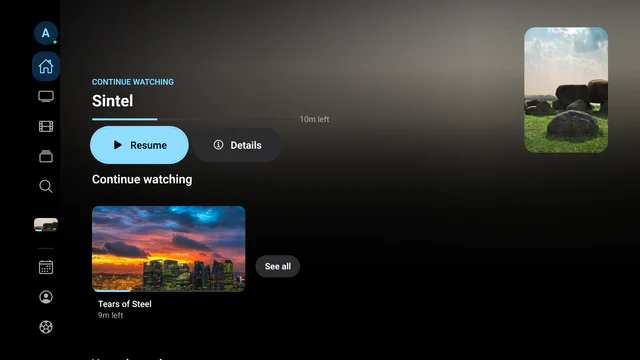
Plug a Chromecast with Google TV, a Google TV Streamer or a Xiaomi Mi TV Stick into a free HDMI port, and install Aina from Google Play. You get the whole app made for the remote: a rail down the side, the guide, films and series, and every stream your provider sends, played with libVLC.
- 1
Plug the device in
Into an HDMI port and into the power. Switch to that input with the Samsung or LG remote and follow the setup on screen.
- 2
Install Aina from Google Play
Search Google Play for Aina IPTV, or open Aina on Google Play on your phone or computer and install it on the device from there.
- 3
Sign in from your phone
Scan the QR code Aina shows with your phone’s camera and type your Xtream Codes login, M3U playlist link or MAC portal there. The television signs in by itself.
- 4
Watch
Your channels, films and series fill in as they load, with the TV guide and catch-up where your provider keeps an archive.
The whole setup, step by step: how to install IPTV on Android TV and Google TV.
Second way: an Apple TV
An Apple TV in an HDMI port runs Aina with the Siri Remote, the guide, films and series. It needs tvOS 16.4 or later; Aina is in the App Store, though not yet in the European Union: how to install it on Apple TV.
Third way: AirPlay or Google Cast from your phone
Many recent Samsung and LG televisions take AirPlay. With an iPhone or iPad, the AirPlay button in Aina’s player sends the picture and sound of HLS and MP4 streams, which includes an Xtream Codes line’s live channels. A playlist’s TS channels and films in MKV or AVI send only their sound that way.
With a Chromecast plugged into the television, the Cast button in Aina’s player, on an iPhone, an iPad or an Android phone, sends what is playing to it, and the television fetches the stream itself.
Last resort: mirroring your phone’s screen
On an iPhone, Screen Mirroring in Control Center sends the whole screen to a television that takes AirPlay, and many Android phones can mirror their screen too. It is the phone’s feature, not Aina’s: the picture is softer, and the phone must stay on and nearby.
The ways, compared
| Way | Picture | Phone free? | Plays every stream? |
|---|---|---|---|
| A Google TV device in an HDMI port | Best | Yes | Yes |
| Apple TV | Best | Yes | Yes |
| Google Cast from the phone to a Chromecast | Good | Yes | Not always |
| AirPlay from an iPhone or iPad | Good | Yes | HLS and MP4 only |
| Mirroring the phone’s screen | Softer | No | Yes |
| Aina on the Samsung or LG itself | Not available | Does not apply | Does not apply |
Questions and answers
No. Samsung’s televisions run Tizen, with Samsung’s own store and no Google Play, so Aina cannot be installed on them. A Google TV device in an HDMI port, such as a Chromecast with Google TV, runs it on the same screen.
No, for the same reason: LG’s televisions run webOS, with LG’s own store. A Google TV device or an Apple TV in an HDMI port is the way to watch with Aina.
If the television takes AirPlay, as many recent ones do, Aina’s AirPlay button on iPhone and iPad sends HLS and MP4 streams with their picture. Other streams send only their sound that way; for those, use a device in an HDMI port or mirror the screen.
A device with Google TV and Google Play, such as a Chromecast with Google TV or the Google TV Streamer, or an Apple TV. Either runs Aina with a remote, on any HDMI port.